Python modules - Installation & Configuration
SQream’s Python Module enables users to integrate custom Python code and functions directly. This allows for advanced data manipulation and custom machine learning operations, all accelerated by GPU.
Configurations:
Sqream configuration: In this version, Python module service is per Sqream worker only. It is required to set configuration change regarding communication details in Sqream config:
Config file |
Flag name |
Flag type |
Default value |
|---|---|---|---|
Sqream config (not legacy) |
pythonModulesGrpcPort |
Worker |
50051 |
Sqream config (not legacy) |
grpcGpuAllocatorPort |
Worker |
50052 |
Python module configuration: Service’s configuration is located in etc/python_service_config.json:
{
     "port": 50051,
     "gpu_alloc_port": 50052
}
Note
Worker flag means it can’t be changed while the worker is up, the change will occur only after Sqream workers restart. Python module flags must match Sqream worker’s flags mentioned above.
How to install python module service
One-time installation
Get the latest version of python module service & extract the package:
tar -xvf <PYTHON_MODULE_SERVICE_PACKAGE>;
cd python-module-service;
Create Python3.11 virtual environment:
python3.11 -m venv my_venv
source my_venv/bin/activate
Install required Python3.11 libraries and run requirements.txt installation (this may take a few minutes):
sudo yum install -y python3.11-devel
pip3.11 install -r requirements.txt
Run Python module service
Activate virtual environment:
cd python-module-service;
source my_venv/bin/activate
Run Python module service:
python3.11 py_modules.py
User notes & limitations:
Environmental:
Python version is limited to the SQream prerequisites compiled version, that means the user must align to the recent SQream version, and upgrading a python version, requires upgrading SQream package.
Python code would run with default Linux privileges therefore could be potentially dangerous and need to be handled with caution.
Python code runs using the privileges of the user account that the SQream worker process operates under.
As mentioned above - In this version there can be a python module service per worker.
Python module execution notes:
Python module’s main purpose is for batch processing, which means, python functions will occur chunk by chunk separately. For example, for ‘max’ function (which is aggregational function), instead of getting one maximum value from all chunks, we will get the maximum per chunk.
Chunk processing is limited to default chunk size (E.g. 1M rows), and cannot be customized when invoked.
In addition to the defined memory limits, the Python module’s internal RAM usage cannot be controlled, which may lead to out-of-memory (OOM) runtime errors. These memory constraints apply to all RAM consumed by the custom code executed within the Python Server.
Python functions that would print to stdout would be visible only where Python module’s process is running.
Error handling should work properly, Python errors would get raised in Sqream as runtime errors.
Python module file path — Only local paths are currently supported. “Local paths” refer to paths that are either relative or absolute within the Python Server’s execution directory.
Unsupported functionalities:
Nested Python module calls are not supported. In other words, a Python UDF cannot invoke another Python UDF or any additional function executed through the Python Server.
The functionality is currently limited to the active database and does not support cross-database access.
Logs:
Python module service has a log configuration file. Logs can be either shown to the console, and also be exported to file (same as we have in Sqream’s log4cxx log configuration).
File path: etc/python_service_log_properties - This path is relative to the Python module service directory.
File content:
Configuration file |
Explanation |
|---|---|
|
keys=root |
|
keys=consoleHandler,fileHandler |
|
keys=standardFormatter |
|
level=DEBUG, handlers=consoleHandler,fileHandler |
|
class=StreamHandler, level=INFO, formatter=standardFormatter, args=(sys.stdout,) |
|
class=logging.handlers.RotatingFileHandler, level=DEBUG, formatter=standardFormatter, args=(‘py_module_service.log’, ‘a’, 1048576, 10) |
|
format=%(asctime)s.%(msecs)03d|%(levelname)s|%(message)s, datefmt=%Y-%m-%d %H:%M:%S |
Note
consoleHandler - Responsible for logs that are been shown as console output, handler_consoleHandler: Handler that supplies additional configuration for console output logs. For example:
* Class: Handler category, in this case it will be StreamHandler.
* Level: Required log level (Supported levels: ERROR / WARNING / INFO / DEBUG).
* Formatter: In which format the logs will be shown.
* args: Arguments which are required for the handler class (keep as it is in the example).
fileHandler - Responsible for logs being exported to a log file, handler_fileHandler: Handler that supplies additional configuration for log files exportation:
* Class: Handler category, in this case it will be RotatingFileHandler.
* Level: Required log level (Supported levels: ERROR / WARNING / INFO / DEBUG).
* Formatter: In which format the logs will be shown.
* args: Arguments which are required for the handler class (keep as it is in the example). Based on the supplied example:
'py_module_service.log'- The location + file name of generated log file.
'a'- Means appending on the same file.
1048576- Maximum file size: 1,048,576 bytes (1 MB).
10- Retains 10 log files; older logs are deleted via rotation.
formatter_standardFormatter: Used for declaring formats for different uses:
* format=%(asctime)s.%(msecs)03d|%(levelname)s|%(message)s - The log file that will be shown / exported.
* datefmt=%Y-%m-%d %H:%M:%S - Used for internal usage.
‘message’ part contains statement details, including connection & statement ids, in order to have correlation also with Sqream logs.
Log format: <datetime>|<log_type>|<connection_id>|<statement_id>|<log_message>
Log output example: Python module logs also contain Connection & Session id information, in order to understand what was Sqream’s executed statement that triggered those logs. Also, Python module’s logs are on Python module execution level. In case of multiple execution on the same statement it is possible to correlate between both sides.
In SQream:
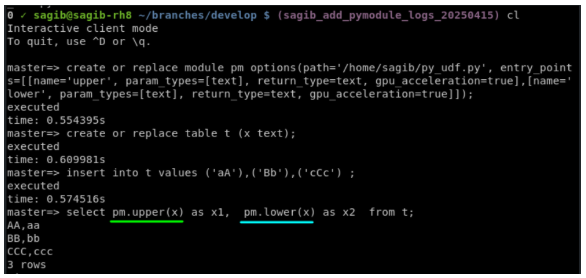
Show node info: (Can see statement’s python execution on node id level):
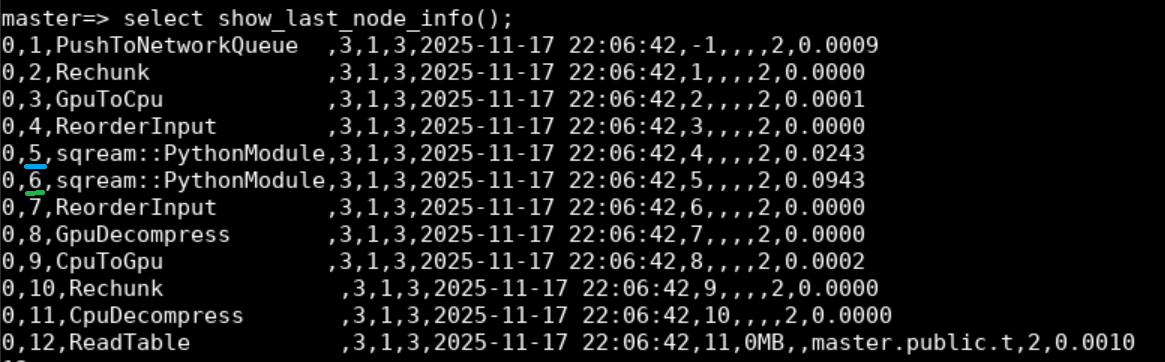
Python module logs:

Note
Logs mentioned in this example can be shown both on console / exported to log file.
module_uid: Python module execution unique identifier - contains:
* Connection ID
* Statement ID
* Node ID (Execution tree identifier from show node info)